How to Choose Photos for a Photo Blanket
Decide between one large photo and a collage, then check faces, contrast, and how the blanket will look when draped.
By Giftelvo
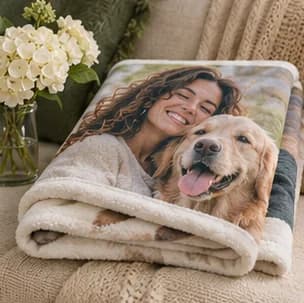
Decide between a single image and a collage
Use one photo if it already tells the story, such as a close portrait of a pet or a family picture from a favorite trip. When you want to include several households or years, select a small group of images with a clear focal photo. Choose one orientation for the main picture before comparing layouts so you can avoid a tight crop.
Compare faces at the intended size
Look at the original files on a larger screen and zoom in on faces and fine details. A compressed group snapshot may look fine on a phone and lose clarity when enlarged. In a collage, give distant faces a larger panel or choose a closer photo. Keep tones fairly consistent across pictures so one dark frame does not disappear alongside brighter ones.
When working with old scans, compare a few source images in the layout before adding text. Use a short title in a clear area if it helps connect the photos.
Preview the blanket where it will be used
If the blanket will sit over the back of a couch, imagine where the fold will land. Put an important face somewhere it can still be seen when the blanket is folded. If the gift is for a chair or bed, compare the available dimensions with the actual space before choosing the crop.
If a collage option is unavailable for the product you select, assemble the images into a single file at the aspect ratio shown by its preview and check the finished crop again.